Knob Tool
 A Knob Tool object is for commands that require an analog value. When a user moves the indicator to a new position, that position is sent as the "value" for the command. Optionally, the object can be configured to prompt the user to confirm the command before it is sent.
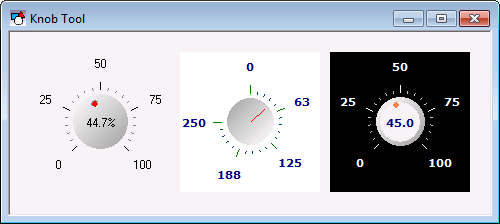
A Knob Tool object must be associated with an analog point. The value of this point sets the position of the indicator. Use the point identifier properties to form a fully qualified CygNet tag string. The point identifier properties are [1:SiteService], [2:Point ID], [3:Long Point ID], [4:Facility ID], and [5:UDC]. If the object is on a templated screen, only use the [5:UDC] property.
The knob can be turned by dragging the indicator or using the mouse wheel, the arrow keys, or the Page Up and Page Down keys. The amount of movement for the wheel and key options is specified by the KeyArrowStepSize, KeyPageStepSize, and the MouseWheelStepSize properties.
The range for the knob is defined by the PositionMin and PositionMax properties. RotationMaxDegrees specifies the number of degrees the knob can be rotated. The default value is 270. If set to 1 full rotation (360 degrees), the first label will not be shown. If set to multiple rotations (720 or above), the labels will overlap. Therefore set ShowTickLabels to 0 - No to disable their display. If the knob is set to multiple rotations, the position percentage is based on the total rotational degrees. That is, if the range is 0 to 100 and the knob rotation is set to 720 degrees, the first full rotation represents 0 to 50 and the second full rotation represents 51-100.
RotationStartDegrees specifies the degree at which PositionMin is set.
The style of the knob is specified by the KnobStyle property. If AutoSize is set to 1 - Yes, the knob radius is calculated based on the object boundary size. If set to 0 - No, you can use the KnobRadius property to specify the size. The indicator is defined by the IndicatorStyle and IndicatorSize properties. The color specified by the IndicatorActiveColor is shown when the knob is being turned.
The ShowPositionDisplay property enables the value of the object’s point to be shown in the center of the knob. When enabled, it also shows the position of the indicator as the knob is turned.
The [AlarmElement] property can be set to show the point state color in the object’s Background Color, the Track Color, or not at all (None). When set to None, the color specified for each component is shown. If set to one of the other options, the component color is replaced with the point state color.
The [UseCustomStateColors] property enables the object to use its own custom point state colors. If set to 1 - Yes, the colors used are those defined by the object’s [CustomStateColors] property. If set to 0 - No, the colors are those defined by the TheView’s [CustomStateColors] property.
More:
 Knob Tool - Command Name
Knob Tool - Command Prompt
Knob Tool - Properties, Events, and Methods
Knob Tool - ActiveX Properties
Knob Tool - Dynamic Configuration of ActiveX Properties

